A three-year ERP budget: an illustrative worked example
Build an ERP budget with explicit subscription, implementation, operations, and contingency assumptions, then test what changes the decision.
Build a three-year ERP budget by separating one-time delivery, recurring software, ongoing operations, and uncertain changes. Keep the assumptions visible and distinguish cash spending from internal capacity. Three years is a chosen planning horizon here, not a rule about how long an ERP system should be kept or how quickly it should pay for itself.
State the budget boundary
For this worked example, assume a fictional company launches all users at the start of the first year. It has 25 identical licensed users, no price changes, no currency changes, and no phased payments. The model excludes taxes and financing. These simplifying assumptions make the arithmetic understandable; a real project may need a month-by-month schedule and different tiers.
Use a written inclusion list. In this example, implementation includes configuration, migration, training, and launch support, while annual operations includes administration and integration support. If your quote bundles one of these items into the subscription, remove the duplicate line. If a task is performed internally, show the expected hours separately and decide with finance whether to value that time in the business case.
Calculate the base case
| Line | Illustrative calculation | Three-year amount |
|---|---|---|
| Subscription | 25 × $80 × 12 × 3 | $72,000 |
| Implementation | One-time amount | $30,000 |
| Operations | $6,000 × 3 | $18,000 |
| Modeled total | Sum of these lines | $120,000 |
Every figure in this table is an illustrative input. The $80 is not being attributed to a product and the $30,000 is not an implementation benchmark. Replace each with evidence from the project scope and written commercial documents. The base case is useful because another person can reproduce it, not because it resembles a rounded budget someone has used before.
Separate year-one cash from the recurring run rate
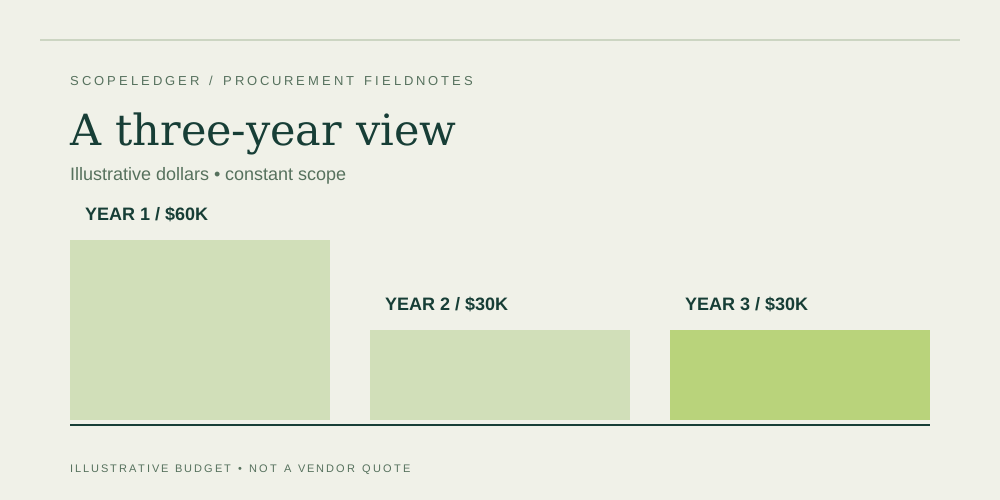
In the example, the annual subscription is $24,000 and annual operations are $6,000. Year one adds $30,000 implementation, making $60,000. Years two and three are $30,000 each under the unchanged assumptions. The recurring run rate is $30,000 annually, but the project needs $60,000 in the first year. A budget that only shows the run rate conceals the launch cash requirement.
Payment timing may be even more concentrated. An annual software invoice and upfront delivery milestone can arrive before the system produces any operational benefit. Add a cash schedule for the actual invoice dates and milestones. Ask treasury or finance to review affordability and working-capital effects rather than interpreting the nominal three-year total as proof that the organization can fund the project.
Run separate downside scenarios
If five more users are needed for the whole horizon, unchanged pricing adds 5 × $80 × 12 × 3 = $14,400. If implementation requires another illustrative $10,000 of approved work, the total rises to $144,400. Keep those effects separate so the team can see that user count and delivery changes have different owners and controls. Do not apply every possible downside simultaneously and call it a forecast.
For an uplift scenario, use the same 25 users but assume a hypothetical 5% annual increase starting in year two. Subscription becomes $24,000 + $25,200 + $26,460 = $75,660, an increase of $3,660 over the base case. That rate is chosen for illustration. The actual contract determines whether, when, and to which lines an increase can apply.
Use contingency honestly
A reserve should address uncertainty, not replace known scope. List the unresolved items, the possible response, and the evidence needed to improve the estimate. If the organization uses a percentage reserve, show the percentage and base separately. A reserve is not automatically an approved change budget, and it should not be hidden inside a supplier's supposedly fixed fee.
Review the budget at decision gates and after material scope changes. Replace assumptions with actual quotes or measured effort when available. Preserve earlier versions so the sponsor can see why the forecast moved. The total cost calculator supports the simplified arithmetic; your procurement file should retain the detailed line items, payment schedule, internal effort, and risk assumptions that make the output meaningful.
Approval worksheet
At the budget review, ask which three assumptions could most plausibly change the recommendation. Choose scenarios tied to real uncertainties, such as the approved role map, a pending interface estimate, or the rollout sequence. Show each scenario separately before considering a combined downside. This lets the sponsor see the decision's sensitivity without mistaking a list of possibilities for a probability forecast.
Keep an assumptions register beside the calculator output. Each entry should state its source, owner, confidence, and next validation step. If a value is intentionally illustrative, retain that label wherever the total is reused. When a supplier quote replaces it, record the new scope and commercial basis rather than updating only the number. After approval, use actual commitments and invoices to compare against the budget, with uncommitted work and remaining assumptions visible in the forecast to complete.
FAQ
Why use three years?
It makes recurring charges visible without pretending to forecast the entire life of the system. Use a different horizon if your organization has a defensible planning basis, and apply it consistently across alternatives.
Does the total include tax or depreciation?
This illustration does not. Tax, accounting treatment, and financing depend on the organization's circumstances and transaction. Have finance add the appropriate treatment in a separate, clearly identified view.
Can the base case be treated as a guaranteed budget?
No. It is conditional on the inputs and scope. The arithmetic can be correct while the inputs are incomplete. Keep exclusions, unpriced work, and pending decisions visible beside the total.
Sources
- Microsoft Business Central pricing — official commercial reference to consult for an actual product quote; the table above is independent illustrative arithmetic.
Continue the workbook
- ERP buying checklist: from requirements to approval
- ERP business case: separate cash savings from capacity
- ERP demo checklist: test workflows instead of slides
Use the ERP total cost calculator for your own scenario, the quote readiness checklist to track evidence, and the cost structure comparison to review purchasing models.